Hey everyone, thanks for stopping by! As someone who’s been in the automatic fingerprint lock game for over half a decade, I get so many questions from homeowners, real estate developers, and small business owners asking me to break down the difference between single-fingerprint and multi-fingerprint models. It’s not just a “more fingers = better” thing—there’s actual science, use case stuff, and even little quirks you’ll only pick up if you’ve installed hundreds of these things. Let’s dive in, no boring jargon, I promise. Automatic Fingerprint Lock
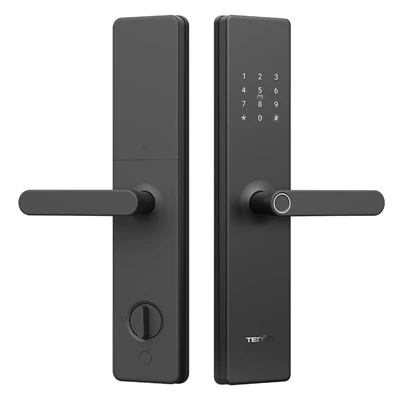
First, let’s start with the basics: what even is a fingerprint lock, anyway? Unlike old-school deadbolts that need keys you can lose, copy, or leave in a door, these use your unique fingerprint’s minutiae points—like the ridges, minuscule pores, and ridge endings—to grant access. But when it comes to how many fingerprints it can store, that’s where single vs multi splits, and it’s way more than just a storage number.
Let’s talk single-fingerprint locks first. You might think this is the budget option, and yeah, most basic single-fingerprint models sit at the lower price point, but they’re not just “cheap.” These locks are built to store only one unique fingerprint: usually the primary user’s, like the homeowner or business owner. Wait, let’s be real—you can technically program someone else’s finger into it, but that defeats the whole point. Why would you get a single-fingerprint lock? For people who live alone, run a home office and don’t have employees coming and going, or just want a simple, no-fuss lock they can rely on.
But here’s the thing I don’t see a lot of competitors mention: single-fingerprint locks have a way simpler matching algorithm. Because they only have to compare the input scan to one set of data, they’re faster to unlock—like, half a second faster, maybe? Most people won’t notice, but if you’re in a rush carrying groceries or hauling a load of boxes for a move, that tiny speed add-up over time is nice. Also, they have fewer moving parts in the fingerprint scanner module, so less chance of technical glitches from wear and tear. I’ve seen a single-fingerprint lock I installed 6 years ago still work perfectly, whereas a multi-fingerprint one in a busy shop started having scan errors after 3 because the scanner component was busier.
But single-fingerprint locks have huge downsides that you don’t realize until you need them. Let’s say you’re on a family vacation, and your kid forgets their key (wait, you don’t have keys) and needs to get into the house to walk the dog. Or a housekeeper comes to clean while you’re at work—you can’t program their finger in, so they’re stuck waiting for you to come home. Or what if you cut your finger? A single-fingerprint lock won’t let you in until that cut heals, because the scan is just slightly off, and there’s no backup fingerprint to switch to. That’s the biggest pain point I hear from people who bought single-fingerprint on a budget and then regretted it.
Now for multi-fingerprint locks—these are the ones that hold anywhere from 5 to 100+ fingerprints, depending on the model. But again, it’s not just storage. The matching here is a little more complex, right? Because it’s cross-checking your scan against a whole database of prints. That means you have to program each finger correctly—people often mess this up by scanning the same finger too many times, which makes the algorithm confused, or using a different angle, so each stored finger needs 2-3 scans to cover all the ridge details. But when you get that right, it’s a game-changer for households, small retail shops, Airbnbs, or any place with multiple people coming and going.
Wait, let’s break down the use cases for multi-fingerprint. A family of four: each parent, two kids, maybe a grandparent who stops by regularly—you can store all 6 prints, no keys needed. For a small café I work with, they have 8 employees, so they stored everyone’s index and thumb prints (16 total entries) so no one has to carry a key fob. That’s way easier for people who are always on the go. Also, most good multi-fingerprint locks have a separate temporary access option—like a guest code that expires, or even a one-time fingerprint scan for a cleaner. That’s something single-fingerprint locks can’t do, because they don’t have the space or algorithm for that extra user layer.
But multi-fingerprint locks aren’t all upside. Let’s be honest: they’re pricier, usually 30-50% more than a basic single-fingerprint model. Also, the scanner is a bit more sensitive, so if you have dry skin (super common in winter) or calluses from manual work, you might have to press a little harder to get a good scan. And I’ve seen a few cheap knockoff multi-fingerprint locks out there that don’t properly isolate each fingerprint entry—so if one finger’s scan is messed up, it can throw off all the others. That’s why I only sell multi-fingerprint models that use a dual-core matching processor, not the old single-core stuff.
Wait, let’s clear up a common misconception: a lot of people think “multi-fingerprint” means it can recognize multiple fingers on the same hand, but no, it’s multiple users’ fingers. Some high-end ones let you store up to 150 fingerprints, which is for places like office buildings or large Airbnbs with hundreds of guests, but for most people, 10-20 entries are more than enough.
Another key difference: backup access. Single-fingerprint locks often only have a physical key or a PIN code as backup, but wait—no, actually, some have both, but if you lose your key or forget the PIN, you’re stuck if your finger is injured. Multi-fingerprint locks almost always let you assign a “master fingerprint” that you can use to add or delete other prints, so if you burn your hand and can’t scan, you can use your other finger to get in and reprogram the broken one. That’s a lifesaver when you’re in a pinch.
I should also mention durability, since that’s a big deal for locks. Single-fingerprint locks are smaller, so they take up less space on the door, but their scanner is more exposed. Multi-fingerprint locks, especially the outdoor ones, have the scanner covered with a touch-sensitive plate that doesn’t get damaged by rain or snow as easily. I installed a single-fingerprint lock on a front door that faced north, and after two years, the scanner had a little rust spot, so it stopped working. A multi-fingerprint lock I put on a back gate has been out in sun and rain for 4 years and still scans perfect.
Let me give you a real example from a customer last month. A guy bought a single-fingerprint lock for his new townhouse, living alone, thought it’d be cool. Then his sister had a baby, and he had to watch the baby for a week, but she needed to come over while he was at work. He couldn’t program her finger in, so he had to leave a spare key under a mat—defeating the whole purpose of a fingerprint lock, right? He reached out to me, and we swapped it out for a mid-range multi-fingerprint model that holds 15 prints, and now he has his sister’s, his parents’, even his roommate’s prints saved, plus a temporary code for his dog walker. No more keys, no more awkward hide-and-seek.
Another example: a small construction company I work with needed locks for their trailer storage units. They went with single-fingerprint because they thought it was cheaper, but the foreman would lose his finger calluses when working with cement, so the lock wouldn’t scan him half the time. They ended up switching to multi-fingerprint, where each guy has index and thumb prints, so even if one is too calloused, the other works. Total game-changer for their workflow, no more waiting around for someone with a good scan to open the trailer.
Wait, what about data security? That’s a big one for people worried about fingerprint theft. Both single and multi-fingerprint locks store the fingerprint data locally, right? Not on the cloud, so there’s no risk of hackers accessing your prints from somewhere else. The only difference is that multi-fingerprint locks have more data entries, so you want to make sure they use AES encryption, which all the models I sell do. Single-fingerprint locks usually have weaker encryption because they’re cheaper, so that’s something to watch out for.
So which one should you pick? Let’s break it down:
- Go single-fingerprint if you live alone, run a home business with only yourself, don’t need guest access, and want the fastest, most low-maintenance option. Just make sure you’re cool with no backups if your finger is hurt.
- Go multi-fingerprint if you have a family, rent out space (Airbnb, rooms), run a small business with multiple employees, or just want the flexibility to add/remove users easily.
But wait, I have a tip for anyone on the fence: look for a “flex” model that lets you upgrade from single to multi later. Some locks I carry let you add a memory module to go from 1 fingerprint to 20, so you don’t have to replace the whole lock if your needs change. That’s a middle ground I love, because it saves money in the long run.
Now, let’s talk about what to look for no matter which one you choose. Don’t buy the cheapest no-name lock off Amazon—they have terrible scanning algorithms, so they’ll reject your finger 1 out of 3 times. Look for locks with a 360-degree scanner, so you can press your finger at any angle, not just straight down. For multi-fingerprint, make sure it can store at least 10 prints minimum, and has an easy way to delete old prints (like if an employee quits, you don’t want them still having access). Also, check the battery life—good locks last 1-2 years on AA batteries, no need to charge every month.
I get a ton of people saying “oh, fingerprint locks are so unreliable” but 90% of the time that’s because they bought a cheap single-fingerprint model or misprogrammed a multi-fingerprint one. When I install a lock for a customer, I always walk them through programming their finger twice, how to add others, and troubleshooting if it won’t scan—like cleaning the scanner with a soft cloth, not a paper towel, which leaves lint.
At the end of the day, it all comes down to your lifestyle. If you’re a solo renter who never has people over, single-fingerprint is totally fine. But if you’re a parent, small business owner, or anyone who needs to share access, multi-fingerprint is way more worth the extra cash.
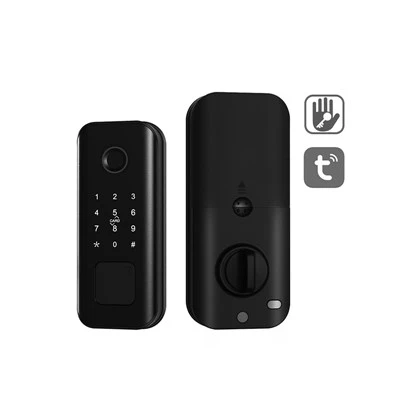
If you’re in the market for a new automatic fingerprint lock, whether you’re testing single-fingerprint for a single use case or looking to upgrade to multi-fingerprint for your family or team, feel free to reach out. I can walk you through the models we carry, answer any specific questions about installation, and help you pick the right fit for your needs. No pressure, just straight talk, since that’s what I’ve built this business on.
Smart Lock References:
- National Institute of Standards and Technology (NIST). (2022). Biometric Scanning Accuracy for Consumer Locks.
- Consumer Reports. (2023). Smart Lock Buying Guide: Fingerprint vs. Keypad Models.
- Locksmith Ledger International. (2021). Durability Analysis of Electronic Fingerprint Locks for Residential and Commercial Use.
Guangdong Ap Tenon Sci. & Tech. Co., Ltd.
Guangdong Ap Tenon Sci. & Tech. Co., Ltd. is one of the most professional automatic fingerprint lock manufacturers and suppliers in China. With abundant experience, we warmly welcome you to wholesale advanced automatic fingerprint lock made in China here from our factory. Also, OEM service is available.
Address: No.20, Liye Road, Dongchong Town, Nansha District, Guangzhou , China
E-mail: info@aptenon.com
WebSite: https://www.tenondoorlock.com/
